
Updated July 29, 2026. This commercial planning guide is not legal, tax, payment, or financing advice. Requirements vary by product, location, program, and jurisdiction.
Published transaction economics: ID + face verification is $1.00 per attempted verification. Fingerprint verification is $0.50 per successful match, with no fee on failed fingerprint scans. Card processing is provided by Lifted Payments at 3.99%; a separate payments application and approval are required before go-live.
See the complete operation.
Inspect every demo page, then request delivery scope and financing options for your route.
Start with fleet health
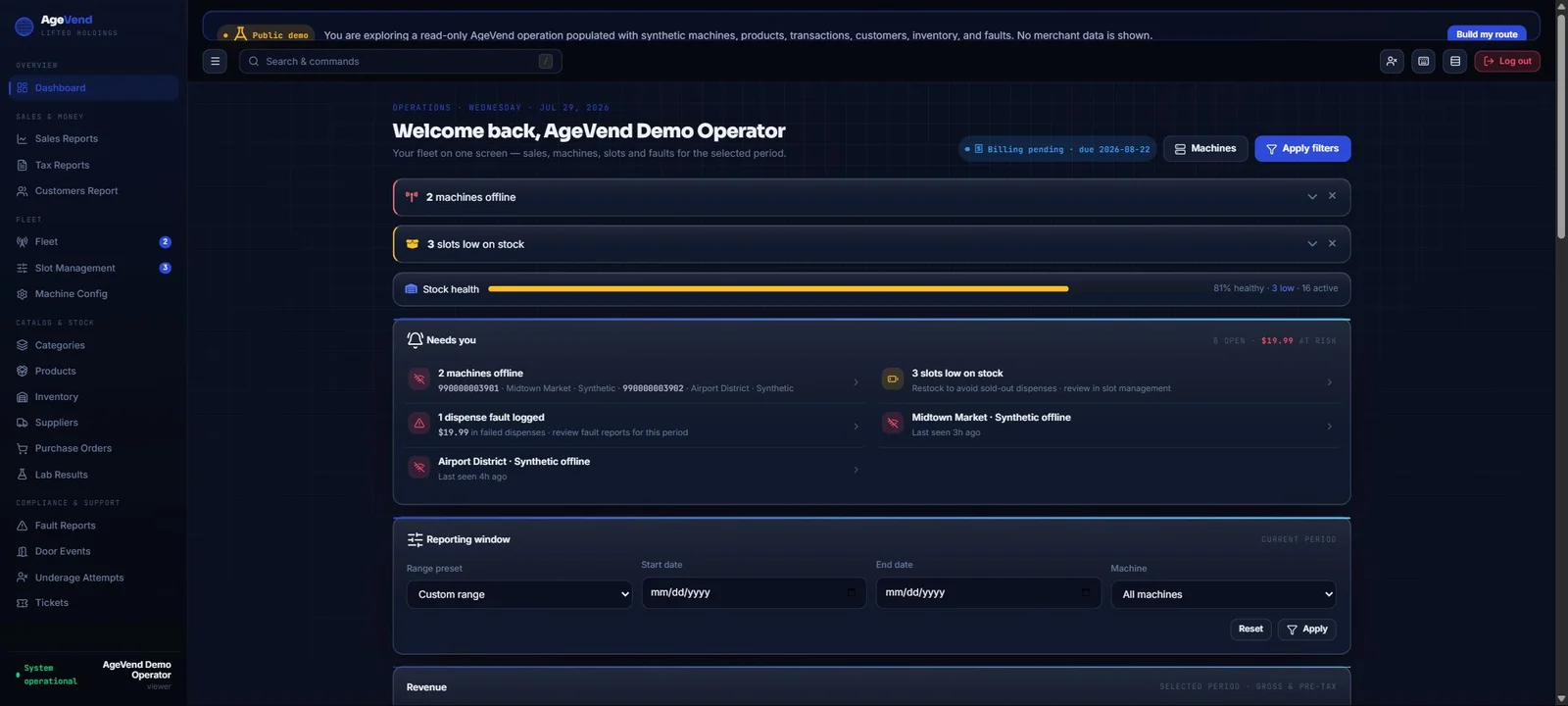
The first route question is often not “how much did we sell?” but “which machine needs attention?” Machine status, heartbeat, stock state, and faults help the operator prioritize a visit before opening several disconnected reports.
AgeVend’s public demo includes synthetic machines and faults so buyers can inspect the operating layout without viewing a real merchant tenant.
Connect products to physical inventory
A product record and a machine slot answer different questions. Product data describes the item; inventory data describes where units are available. The operator needs both, plus a repeatable process for receiving, loading, reconciling, and removing stock.
Use machine-level reorder points based on sales velocity and route timing. A fast-moving location close to the warehouse may need a different threshold from a slower, distant stop.
Reconcile orders, sales, and tax
Review order status, transaction amount, payment outcome, tax treatment, and delivery result as one operating record. Exception handling should make failed or disputed transactions easy to locate without exposing sensitive payment data unnecessarily.
Tax configuration and reporting remain operator responsibilities. Confirm product and jurisdiction treatment with qualified advisers and reconcile reports to settlement and accounting records.
Use customer tools with boundaries
The connected kiosk includes account, loyalty, cart, support, and lab-results entry points. The dashboard’s customer and support surfaces should help resolve legitimate issues while limiting access to the people who need it.
Review retention, export, permission, and support procedures before launch. A useful customer view is not a reason to give every route user unrestricted access.
Manage content and support remotely
Campaign screens, machine messages, and product presentation can change the customer experience without a physical visit. Treat remote content changes as operational changes: assign ownership, review before publication, and keep an audit trail.
Tickets and fault workflows should connect an observed issue to an owner, status, note, and resolution. The dashboard is most valuable when it closes the loop between detection and action.
Inspect the complete public demo
The AgeVend public demo provides 19 navigation destinations and 15 representative pages that return successfully. It uses a tenant-scoped viewer session, synthetic data, and disabled mutation endpoints.
Open the read-only operator demo, then compare the machine, product, inventory, order, tax, customer, fault, campaign, ticket, and team surfaces to your route responsibilities.
Questions buyers ask
Does the public demo contain real merchant data?
No. It is populated with clearly labeled synthetic machines, products, inventory, transactions, and faults.
Can public demo users change data?
No. The demo uses read-only permissions and mutation endpoints are disabled.
How many demo navigation destinations are available?
The current public demo exposes 19 sidebar destinations.
Can the dashboard support multiple machines?
The platform is organized around tenants, machines, products, inventory, orders, customers, tax, faults, support, and team access.
Ready to evaluate the AV-1?
Start with the published $9,500 base price, a real connected-machine screen, the read-only operator demo, and a written route quote covering the complete deployment.